Note
This is basically my note for PMPP chapter on multidimensional data and memory locality. In Part I, we learned how CUDA works at high level with vector addition. In this part, we move to matrix multiplication because this is where CUDA starts to become actually interesting for Deep Learning. Part III will focus on tiled matmul, and after that we will have enough ingredients for the final boss: flash attention.
Warning (AI Transparency)
All the ideas, notes, and technical content are mine. I use AI (GPT-5.4 from Codex) as a writing assistant.
1. Why Matrix Multiplication?
In Part I, vector addition was our hello world:
C[i] = A[i] + B[i];Each thread computes one output element, and that output element only needs one addition. Very simple.
But in Deep Learning, the operation that appears again and again is not vector addition. It is matrix multiplication (or usually people say matmul). If you look carefully:
- Linear layer is matmul
- Attention contains matmul (
QK^Tand thenPVorsoftmax(QK^T)V) - Even convolution can often be transformed into matmul
So if vector addition teaches us how CUDA threads work, then matrix multiplication teaches us why memory access pattern matters so much.
Note (A tiny BLAS detour)
PMPP also frames this through BLAS (Basic Linear Algebra Subprograms):
- Level 1: vector-vector operations
- Level 2: matrix-vector operations
- Level 3: matrix-matrix operations
Our vector addition in Part I is basically a Level 1 flavor. Matrix multiplication is Level 3, and this is exactly where GPUs start to shine because there is a lot more parallel work and also a lot more opportunity for data reuse.
2. What Does Matmul Actually Compute?
We have:
where:
and each element of C is computed as:
This formula is the whole story.
- To compute one output element
C[i, j], we need rowifromA - and column
jfromB - then we do a dot product between them
For example, if A has shape 2 x 3 and B has shape 3 x 2, then C has shape 2 x 2. The element C[1, 0] is:
This is already different from vector addition. In vector addition, one output needs just one addition. Here, one output element needs a whole k.
So one natural question is:
If vector addition removed the loop and replaced it with threads, what happens for matrix multiplication?
The answer is: the loop does not disappear completely, it moves.
3. From CPU Version to CUDA Version
Let’s first look at the naive CPU code:
void matmul_cpu(float* A, float* B, float* C, int M, int N, int K) { for (int i = 0; i < M; ++i) { for (int j = 0; j < N; ++j) { float sum = 0.0f; for (int k = 0; k < K; ++k) { sum += A[i * K + k] * B[k * N + j]; } C[i * N + j] = sum; } }}We have 3 loops:
- loop over rows
i - loop over columns
j - loop over reduction dimension
k
Now compare this with the CUDA mindset:
- the loops over
iandjare independent work, so they are good candidates to be replaced by threads - but the loop over
kis used to accumulate one scalar output, so each thread still needs that loop
This is the right mental model:
CUDA does not magically remove all loops. It removes the loops over independent work.
And matrix multiplication is a perfect example of this.
4. Your First Matmul Kernel
a. One Thread Computes One Element of C
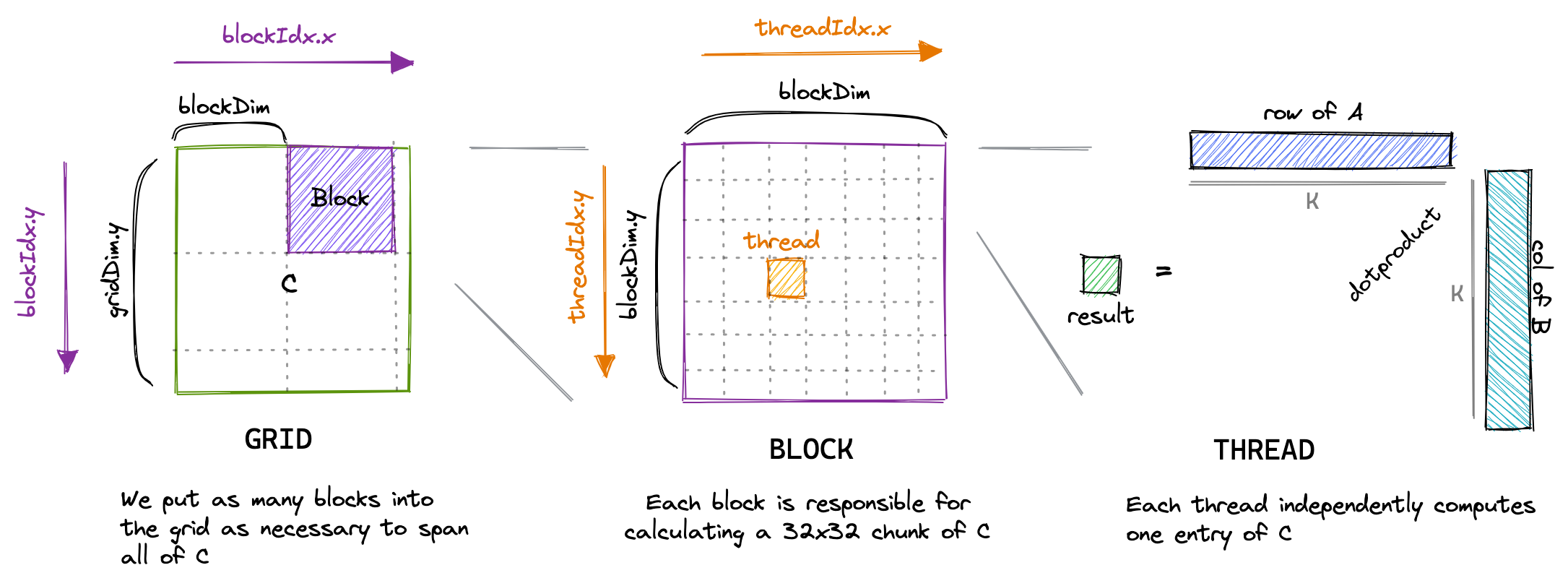
The most natural CUDA mapping is:
- one thread computes one
C[row, col] - one block covers a small 2D tile of
C - one grid covers the whole output matrix
So unlike vector addition, now we want a 2D block and a 2D grid because our output is 2-dimensional.
__global__ void matmulKernel( const float* A, const float* B, float* C, int M, int N, int K) { int row = blockIdx.y * blockDim.y + threadIdx.y; int col = blockIdx.x * blockDim.x + threadIdx.x;
if (row < M && col < N) { float sum = 0.0f;
for (int k = 0; k < K; ++k) { sum += A[row * K + k] * B[k * N + col]; }
C[row * N + col] = sum; }}This kernel is simple, but there are some very important things to notice:
- We use
blockIdx.yandthreadIdx.yto identify the row. - We use
blockIdx.xandthreadIdx.xto identify the column. - Each thread computes exactly one output element.
- The thread still has a loop over
k, because it needs to do the dot product.
So each thread is basically saying:
“You give me one coordinate
(row, col), then I will computeC[row, col].”
You can see the visualization below (source: https://siboehm.com/articles/22/CUDA-MMM ):
b. The Launch Configuration
The host code to launch this kernel is also straightforward:
dim3 blockDim(16, 16);dim3 gridDim((N + blockDim.x - 1) / blockDim.x, (M + blockDim.y - 1) / blockDim.y);
matmulKernel<<<gridDim, blockDim>>>(d_A, d_B, d_C, M, N, K);We can interpret this as:
- each block has
16 x 16 = 256threads - each thread computes one element of
C - each block therefore computes one
16 x 16patch of the output matrix
And because C has shape M x N, we need enough blocks in the grid to cover all rows and columns of C.
Warning
This is a good beginner kernel, but not a good high-performance kernel. It is correct, clear, and useful for intuition. That is enough for now. We optimize it in Part III.
c. Why Not One Thread Per Row?
You may ask: why not assign one thread to compute one whole row, or one whole column?
You absolutely can do that as an exercise, and PMPP asks exactly this kind of question. But if we do that for an N x N output matrix:
- one-thread-per-row gives us only
Nthreads - one-thread-per-column also gives us only
Nthreads - but one-thread-per-output-element gives us
N^2threads
This is much better for GPU because GPU wants a lot of fine-grained parallel work.
So the one-thread-per-element mapping is the standard starting point.
5. A Small Glimpse Under the Hood
So far, we have only discussed the CUDA programming model:
- grid
- block
- thread
But if we want to reason about performance, these are not enough. We also need some hardware intuition from PMPP Chapters 3 and 4.
Blocks and SMs. A GPU is composed of multiple Streaming Multiprocessors or SMs. When we launch a kernel, CUDA assigns blocks to SMs for execution. This immediately explains one of the most important rules in CUDA:
Thread blocks should be independent.
One block may run on one SM, another block may run on another SM, and CUDA does not promise that all blocks run at the same time or in any particular order. This is also why synchronization is easy inside a block with __syncthreads(), but not across the entire grid in a regular kernel launch. So when we design a kernel, we should think:
- threads in one block can cooperate
- blocks in one grid should be independent
This point will matter a lot in tiled matmul because one block will cooperatively load one tile of data into shared memory.
Warps. CUDA lets us program as if threads are independent, but hardware execution is more structured than that. Threads are grouped into warps of 32 threads, and a warp is the basic execution unit that the SM schedules. This is why the number 32 appears everywhere in CUDA:
- warp size is 32
- block dimensions are often chosen as multiples of 32
- memory access discussions are often warp-level discussions
So although CUDA code looks thread-centric, performance reasoning is often really warp-centric.
Note
This is also why we should not think of CUDA threads as “mini CPU threads”. CUDA gives a thread-like programming model, but the hardware is still optimized around warp execution.
Exercise (Exercise: Blocks, SMs, and Warps)
Suppose we launch a naive matmul kernel with 216 blocks and each block has shape dim3(16, 16).
a. How many threads are there in each block?
b. How many warps are there in each block?
c. If the GPU has 108 SMs and resources are sufficient, roughly how many blocks can be assigned to each SM on average?
d. Why must these blocks be written to be independent of each other?
Answer (Don't peek to it)
a. 16 x 16 = 256 threads per block.
b. 256 / 32 = 8 warps per block.
c. 216 / 108 = 2, so roughly 2 blocks per SM on average.
d. Because blocks may run on different SMs and in arbitrary order, and CUDA does not provide a built-in global barrier inside a normal kernel launch.
Warp divergence. Now we can understand warp divergence in a more concrete way. In the naive matmul kernel, we have:
if (row < M && col < N) { ...}For blocks that sit at the matrix boundary, some threads in a warp may be in range while other threads are out of range. That means threads in the same warp do not all follow the same control flow. This is warp divergence. In naive matmul, boundary divergence is usually not the dominant bottleneck, but it is still useful to notice because it shows one key lesson from Chapter 4:
Performance depends not only on what one thread does, but also on what the whole warp does together.
Exercise (Exercise: Warp Divergence at the Boundary)
We launch a naive matmul kernel with blockDim = dim3(16, 16) to compute an output matrix C of shape 30 x 30.
a. How many threads are in the bottom-right block (blockIdx.x = 1, blockIdx.y = 1)?
b. How many of those threads are actually in range and do useful work?
c. How many warps are in that block?
d. How many warps in that block experience divergence because of the boundary check?
Answer (Don't peek to it)
a. The block still has 16 x 16 = 256 threads.
b. Only rows 16..29 and columns 16..29 are valid, so useful threads = 14 x 14 = 196.
c. 256 / 32 = 8 warps.
d. With a 16 x 16 block, each warp covers 2 rows of 16 threads. The first 7 warps include partially valid rows and therefore diverge. The last warp corresponds to the last 2 rows, which are fully out of range, so it does not diverge. Therefore 7 warps diverge.
Occupancy and latency hiding. Another concept that we skipped is occupancy. At high level, occupancy tells us how many warps can stay resident on an SM relative to the hardware maximum.
Why do we care? Because global memory is slow. When one warp is waiting for memory, the SM wants another ready warp to run. This is how GPU hides memory latency. So in general:
- more resident warps gives the scheduler more choices
- more choices means better chance to hide latency
But occupancy is not simply:
“More threads is always better.”
Each block consumes resources on the SM:
- registers
- shared memory
- thread slots
- block slots
If one block uses too many registers or too much shared memory, fewer blocks can fit on an SM, and occupancy can go down.
This is a very important tradeoff for tiled matmul:
- using shared memory increases data reuse
- but using too much shared memory can reduce occupancy
So optimization is always a balancing act.
Exercise (Exercise: Occupancy from Block Size)
Ignore register and shared-memory limits for a moment. Assume an A100-like SM can support at most 2048 threads and 32 blocks at the same time.
a. For block sizes 1024, 512, 256, 128, 64, and 32, how many blocks can be resident on one SM?
b. What occupancy do these block sizes give?
c. What occupancy do we get for block size 768?
d. Now assume the SM has 65,536 registers and a kernel uses 64 registers per thread. What is the maximum number of resident threads per SM, and what is the resulting occupancy ceiling?
Answer (Don't peek to it)
a. Resident blocks per SM:
1024 -> 2, 512 -> 4, 256 -> 8, 128 -> 16, 64 -> 32, 32 -> 32 (block limit stops us before reaching 64 blocks).
b. Occupancy:
1024 -> 2048/2048 = 100%, 512 -> 100%, 256 -> 100%, 128 -> 100%, 64 -> 100%, 32 -> 1024/2048 = 50%.
c. For 768, only 2 blocks fit, so resident threads = 1536, occupancy = 1536/2048 = 75%.
d. With 65,536 registers and 64 registers per thread, maximum resident threads = 65,536 / 64 = 1024, so occupancy is at most 1024/2048 = 50%.
At this point, we can build a simple hardware reasoning checklist:
- What is the independent unit of work?
- How should I map that work to threads and blocks?
- What will one warp actually do?
- Where does the data live: global memory, shared memory, or registers?
- Am I reusing data, or am I loading the same values again and again?
- Am I using so many resources per block that occupancy becomes worse?
This, to me, is the real lesson from PMPP Chapters 3 and 4. CUDA is not just “parallel for-loop on GPU”. CUDA is really a constant negotiation between:
- parallelism
- memory access
- synchronization
- hardware resources
And matrix multiplication is the first kernel where all of these ideas start to meet each other.
6. Why This Kernel Is Correct but Still Slow
Now we come to the important part.
Mathematically, the naive kernel is fine.
But performance-wise, it is not good.
Why?
Because it does not really exploit the most important property of matrix multiplication: reuse.
a. Reuse Is Hiding Everywhere
Look again at:
An element A[i, k] is not used once. It is reused across the whole i-th row of C:
So one value from A participates in N output elements.
Similarly, an element B[k, j] is reused across the whole j-th column of C:
So one value from B participates in M output elements.
This is the key intuition:
- matmul has massive data reuse
- naive CUDA matmul does not use that reuse very well
Each thread just reads what it needs from global memory by itself. But many nearby threads need overlapping data.
This means the kernel is correct, but it is a little bit “wasteful”.
b. The Global Memory Traffic Explosion
Assume square matrices for simplicity: N x N.
Then:
- we have
N^2output elements - we launch
N^2threads - each thread runs a loop of length
N - for each
k, it loads one element fromAand one fromB
So each thread performs:
Nmultiply-add steps2Nglobal-memory reads
Across the whole kernel, that becomes:
N^3multiply-add steps2N^3global-memory reads
So even though one value A[i, k] may be useful for many output elements, the naive kernel may fetch it from global memory again and again.
Same story for each B[k, j].
Note (This is the whole motivation for tiling)
The GPU is very fast at arithmetic, but global memory is still much slower than on-chip memories such as registers and shared memory. If we keep reloading the same values from global memory, then the GPU will spend too much time waiting for data.
c. Arithmetic Intensity Intuition
For one iteration of the inner loop, a thread does:
- load
A[row, k]-> 4 bytes - load
B[k, col]-> 4 bytes - do one multiply and one add -> 2 FLOPs
So the rough arithmetic intensity is:
This is very low.
This is why naive matmul is often
An NVIDIA A100 has roughly 1555 GB/s of global-memory bandwidth. With arithmetic intensity 0.25 FLOP/B, the naive kernel is capped around:
which is about 389 GFLOP/s.
But the same GPU has FP32 throughput on the order of tens of TFLOP/s. So this naive kernel is nowhere near compute peak. The bottleneck comes from data movement, not arithmetic throughput.
d. Access Pattern Also Matters
There is another subtle thing here: how threads access memory also matters.
If neighboring threads differ in col, then for a fixed k they access:
B[k * N + col]with consecutive col values. That is good because nearby threads tend to access nearby addresses.
For A, neighboring threads in the same row often need the same value A[row * K + k]. This should immediately make us ask:
“Why are many threads re-reading the same value from global memory?”
Cache may help a bit, but we do not want to rely only on cache. We want a more explicit mechanism to keep reused data closer to the SM.
That mechanism is shared memory, and that is exactly what tiled matmul will use.
7. The Big Idea of Tiling
Now we are finally ready for the next step.
The idea of tiled matmul is actually very simple:
- A block of threads cooperatively loads a small tile of
Afrom global memory into shared memory. - The same block cooperatively loads a small tile of
Binto shared memory. - Threads reuse those tiles many times to compute partial sums.
- Then the block moves to the next tile along the
Kdimension.
So instead of:
- loading the same global-memory values repeatedly per thread
we do:
- load once per block
- reuse many times per block
This is the first place where CUDA programming becomes more than just:
“How many threads should I launch?”
Now the more important question becomes:
“Where should the data live while the computation is happening?”
And this question never really goes away.
Flash attention follows the same philosophy:
- keep the working set small
- reuse on-chip data aggressively
- avoid materializing huge intermediate results if possible
8. A Small Exercise Before Part III
Exercise (Naive Matmul Counting Exercise)
Consider square matrix multiplication C = A x B where A, B, and C all have shape N x N. We use the naive CUDA kernel above where each thread computes exactly one output element.
a. How many threads are launched in total?
b. How many multiply-add iterations does each thread execute?
c. Ignoring cache effects, how many global-memory reads does each thread perform?
d. Ignoring cache effects, how many total global-memory reads are performed by the whole kernel?
e. How many times can one element A[i, k] be used in the mathematical computation of C?
Answer (Don't peek to it)
a. We have one thread per output element, so total threads = N^2.
b. Each thread computes one dot product of length N, so it executes N multiply-add iterations.
c. Each iteration reads one value from A and one value from B, so each thread performs 2N global-memory reads.
d. Total global-memory reads = N^2 * 2N = 2N^3.
e. One element A[i, k] is used across the whole i-th row of C, so it contributes to N output elements.
9. Final Words
If Part I gave us the execution model of CUDA, then Part II should give us a more honest view of GPU programming.
It is not enough to know how to launch threads. We also need to know:
- how blocks map to SMs.
- how threads execute in warps.
- why divergence happens.
- why occupancy matters.
- why memory movement is often more expensive than arithmetic.
In Part III, we will finally use shared memory and tiling to improve this kernel. That is where all the pieces above start to come together.